
Cybersecurity Services — CMMC Support
94% MatchDHSSDVOSB
SamMatch connects federal prime-contracting data with verified small-business capabilities — built on SAM.gov registrations, SBA certifications, and award intelligence.
SamMatch is built specifically for federal prime-to-subcontractor sourcing and business development. It is not a general bid-search or proposal-writing platform.
Primes document outreach for subcontracting plan compliance. Subcontractors discover matching awards and prepare the next step — paid sub plans never boost organic match ranking.
Find qualified small businesses, manage outreach, and document subcontracting-plan activity
From RFP upload through subcontracting plan documentation and good-faith effort records.
What's included
425,114
Ranked by NAICS and certification when primes run Requirement Assist — not static directory browsing.
Follow award activity, score your readiness, and share verified materials when the fit is right — without paying to stay visible to primes.
Your progression
Free Profile
Claim your UEI, stay eligible for organic prime matching, and reply when primes reach out.
Identify which primes may need you, understand why you match, and prepare the next action
Score readiness, maintain a vault, generate capability statements, and share data rooms with primes
Start free — paid plans never boost organic match ranking.
Ranked matching, RFP upload analytics, verified federal data, and outreach logging — one workspace for subcontracting plan work.
Get a scored list of small businesses in minutes—not days of manual search.
Tell SamMatch what you need for each contract. It finds active, verified small businesses and ranks them by fit.
Enter contract details
Upload an RFP with Requirement Assist or enter PIID, NAICS, and cert type manually
See ranked results
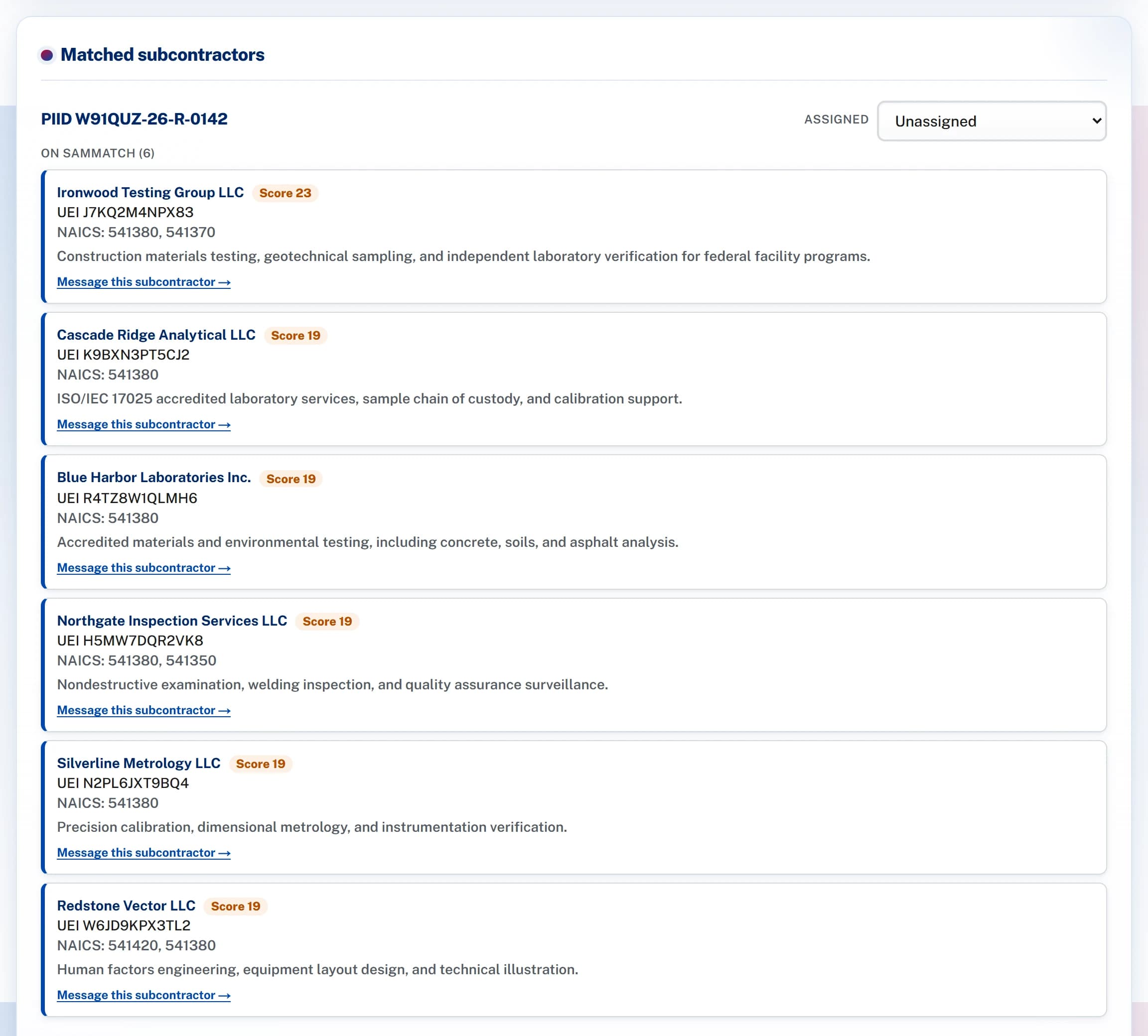
Best matches first, with name, UEI, and capabilities
Reach out
Contact subs from the list—outreach is saved automatically
| You enter | You get |
|---|---|
| Contract ID + NAICS code | A ranked list of small businesses |
| Cert type needed (e.g. HUBZone) | Only firms with that certification |
| Cyber level (optional) | Only firms at or above that level |
| Keywords (optional) | Better matches for specific skills |
Same subcontracting plan work — less manual spreadsheet and inbox hunting.
| Task | The old way | With SamMatch |
|---|---|---|
| Find subs by industry + cert | Export a directory; filter in Excel | Ranked list in minutes |
| Check if a firm is active in SAM.gov | Look up each firm one by one | Inactive firms filtered out automatically |
| Track who you contacted | Search email folders | Messages saved per contract |
| Turn an RFP into search fields | Read PDF; type goals into a spreadsheet | Upload text; review PIID, NAICS, and goal analytics |
| Prep category totals for reporting | Rebuild spreadsheets | Dashboard totals by category |
Free profiles stay in prime search. Signals adds award intelligence. Pursuit adds readiness scoring, vault, capability statements, and data rooms — paid plans never boost organic match ranking.
Know which primes to watch and why a new award may fit your firm.
Track prime contractors and receive pursuit briefs when USAspending data shows new awards or modifications aligned to your NAICS and certifications.
Tap the i next to any capability for a short description.
| Capability | Free profile | Signals($39/mo) | Pursuit($89/mo) |
|---|---|---|---|
SAM.gov UEI claim & verification | |||
Prime requirement alerts | |||
Reply to prime mailbox threads | |||
Signal watchlists & award alerts | |||
Pursuit briefs & weekly digest | |||
Prime readiness score | |||
Past-performance vault & cert tracker | |||
Capability statements & data rooms | |||
Boosts organic prime match ranking | Never | Never | Never |
Visible when primes filter to service-disabled veteran-owned categories.
Match to prime requirements targeting HUBZone plan goals.
Federal subcontracting — not grants or generic small business advice.
Free profile for 8(a) Business Development participants.
Two paths on one platform — prime compliance workspace and subcontractor pursuit intelligence.
Create your workspace and verify your company UEI from SAM.gov. Preview matching before you subscribe.
Requirement Assist extracts PIID, NAICS, and subcontracting goal analytics from solicitation text — pre-award or post-award.
Get a scored list of 8(a), HUBZone, SDVOSB, and WOSB firms in minutes — not days of manual SBS search.
Message subs in-app and log outreach automatically for your FAR 52.219-9 good-faith effort file.
Load your public SAM.gov profile and see how many primes and recent awards match your NAICS and certifications.
Verify through your SAM.gov point of contact. Stay eligible for organic prime matching at no cost.
SamMatch Signals alerts you when matching primes win new federal awards or receive modifications.
SamMatch Pursuit adds readiness scoring, a past-performance vault, capability statements, and shareable data rooms when you are ready to pursue.
Every requirement becomes a ranked match list scored on NAICS alignment, certification, and capability keywords pulled from your solicitation — with each solicitation logged against the requirement for your FAR 52.219-9 record.
Ranked matching, Requirement Assist, compliance dashboards, outreach logging, and optional capacity alerts from Pursuit subscribers — separate from ranked matching. Search 425,114 ACTIVE SAM.gov-verified records.
$124.50/mo · $249/mo founding beta
Start free for organic prime matching. Add Signals for award intelligence. Upgrade to Pursuit for readiness, vault, and data rooms — paid plans never boost match ranking.
Practitioner guides and comparisons — written for teams who already know SBS (formerly DSBS), SAM.gov, and SAM.gov Subcontracting Plan Reporting.
How federal prime databases differ from commercial GC directories.
DSBS is now SBA Small Business Search — check the profile primes see.
Requirement-driven matching vs directory search.
Upload one solicitation before you subscribe — no card required.
Pre-award through post-award plan execution.
What belongs on the one-pager — then keep it live when primes search.
FAR 52.219-9 workflow — source subs, log outreach, prep ISR/SSR data.
SamMatch organizes subcontractor sourcing, outreach, and category data to support ISR and SSR preparation. Official reports are submitted through SAM.gov. SamMatch does not make legal or compliance determinations.
How SamMatch helps compliance and capture teams source certified subcontractors faster, document outreach, and stay audit-ready under FAR 52.219-9.
In SamMatch you enter a target NAICS code and the socio-economic category you need, and the engine returns ACTIVE SAM.gov-registered small businesses ranked by fit. Claimed member firms can be messaged in-app; unclaimed firms can be solicited through their SAM.gov registration contact. This replaces manually cross-referencing SAM.gov and SBA exports for each requirement.
Small Business Search (SBS), formerly Dynamic Small Business Search (DSBS) is a static government directory you query one search at a time. SamMatch is a modern alternative that ranks subcontractors against your specific subcontracting requirements, extracts draft fields from RFP uploads via Requirement Assist, filters to ACTIVE SAM.gov registrations, syncs SBA Small Business Search (SBS) data automatically, and gives you a workspace to track outreach and matches across every contract.
SamMatch lets prime contractors record each contract's PIID, NAICS targets, and required socio-economic categories, then surfaces compliant subcontractors for every goal. A compliance dashboard shows your active requirements by category so you can see where you still need HUBZone, WOSB, SDVOSB, or 8(a) coverage before reporting.
Yes. SamMatch keeps a record of the certified small businesses you identified and the outreach you sent through the platform — including solicitations emailed to unclaimed firms via their SAM.gov registration contact — which supports the good-faith-effort narrative contracting officers expect. SamMatch organizes this evidence; it does not provide legal determinations or file reports on your behalf.
SamMatch validates each firm's Unique Entity ID (UEI), CAGE code, NAICS codes, and ACTIVE registration status against SAM.gov, and syncs socio-economic certifications from SBA data. Only ACTIVE registrations appear in match results, so you are not reaching out to expired or unregistered vendors. Firms whose representatives have claimed and verified their profile are additionally flagged as claimed members.
SamMatch helps you assemble the underlying data — which subcontractors you engaged, their certifications, and your progress against each goal — that feeds Individual Subcontract Reports (ISR) and Summary Subcontract Reports (SSR). Individual Subcontract Reports (ISR) and Summary Subcontract Reports (SSR) are filed through SAM.gov Subcontracting Plan Reporting. SamMatch keeps sourcing and outreach data organized for report preparation; it does not file reports or make compliance determinations.
Yes. Requirement Assist lets prime contractors paste or upload solicitation text. SamMatch extracts draft PIID, primary NAICS, subcontracting goal percentages for HUBZone, WOSB, SDVOSB, and 8(a), a suggested socio-economic category, and a supporting source snippet from the RFP. Your team reviews and attests accuracy before the requirement enters ranked matching — extracted data is never auto-posted.
Founding beta is $124.50/mo — 50% off the $249/mo list price, locked for the life of the subscription (25 of 25 spots left). Prime contractors get ranked matching, Requirement Assist (RFP upload analytics), the FAR 52.219-9 compliance dashboard, and in-app outreach. Subcontractors join free, which keeps the small business pool deep for primes searching it.
SamMatch matches against the categories that count toward subcontracting plan goals: HUBZone, Woman-Owned Small Business (WOSB), Service-Disabled Veteran-Owned Small Business (SDVOSB), and 8(a) Business Development participants, plus general small business status — all filtered by NAICS code and ACTIVE SAM.gov registration.
Free signup for HUBZone, WOSB, SDVOSB, and 8(a) firms — matching, Signals, and outreach rules on SamMatch.
Yes — your SamMatch profile is free. Claim with your SAM.gov UEI to stay eligible for organic prime matching, SBS capability enrichment, and in-app replies when primes contact you. Optional paid plans add award intelligence: SamMatch Signals ($39/mo) for prime award alerts and pursuit briefs, and SamMatch Pursuit ($89/mo) for readiness scoring, vault, capability statements, and data rooms.
After you verify your UEI and complete your subcontractor profile, SamMatch alerts you when a prime posts a requirement that matches your NAICS codes and socio-economic certifications — HUBZone, WOSB, SDVOSB, or 8(a). Primes initiate contact; you reply in the mailbox.
SamMatch matches HUBZone, Woman-Owned Small Business (WOSB), Service-Disabled Veteran-Owned Small Business (SDVOSB), and 8(a) Business Development participants, plus general small business status. Certifications are synced from federal SBA/SBS (formerly DSBS) data and gated on ACTIVE SAM.gov registration.
No. Subcontractors reply to prime-initiated threads only — this keeps outreach aligned with prime compliance workflows and reduces spam. When a prime contacts you about a matching requirement, you can respond in-app and receive email notifications.
No. SDVOSB, WOSB, HUBZone, and 8(a) firms join free. Founding beta is $124.50/mo — 50% off the $249/mo list price, locked for the life of the subscription (25 of 25 spots left). Prime contractors get ranked matching, the compliance dashboard, and outreach tools. A deep free subcontractor pool helps primes find qualified small businesses faster.
SamMatch validates your Unique Entity ID (UEI) against SAM.gov on onboarding and caches entity status. Only ACTIVE registrations remain matchable. You attest that profile and certification data are accurate before appearing in prime search results.
Your free profile keeps you in prime search results and lets you reply when primes reach out. SamMatch Signals ($39/mo) adds award intelligence — alerts when matching primes win federal awards or receive modifications, plus pursuit briefs built from public contract data. Signals does not change how primes rank you in Requirement Assist matching.
No. Organic prime matching ranks firms by NAICS fit, certifications, and ACTIVE SAM.gov status — not by subscription tier. Signals and Pursuit unlock intelligence and preparation tools for your team; they never pay-to-rank you higher in prime search results. Pursuit subscribers may optionally broadcast capacity alerts to primes, which is separate from ranked matching.